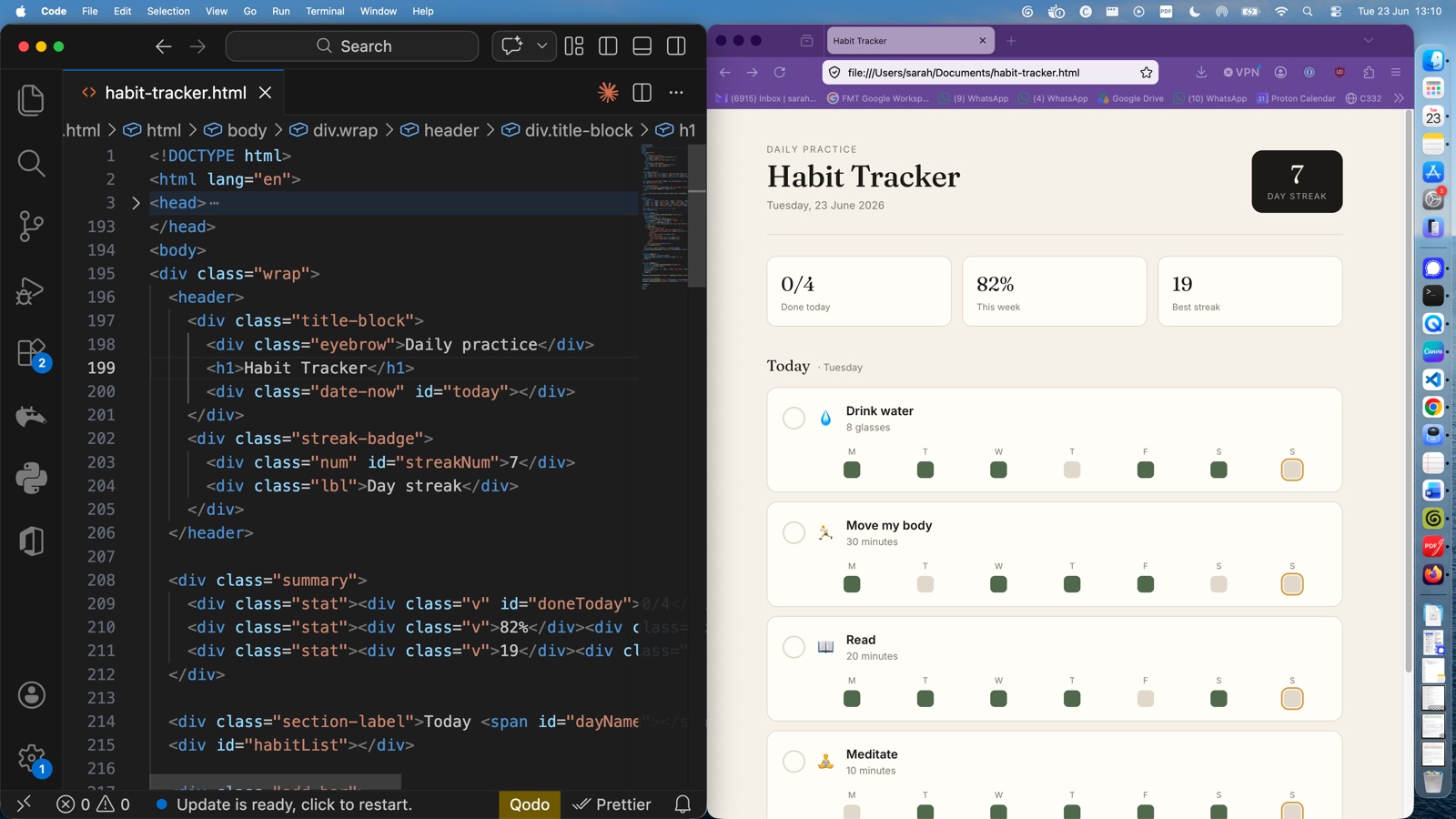
If you read the intro post (or you saw my wittering on Instagram), you know the rough plan: I am going to teach you how to build small, genuinely useful tools with AI, and run them on your own laptop. The big destination, eventually, is a passive time recording tool. But before we go anywhere near that, I want to take you through something tiny first, so the bigger build later doesn't feel terrifying.
So today: a habit tracker. About 2 minutes of work. Doable in the free version of Claude or ChatGPT, in your browser, on whatever computer you already have. No accounts to sign up for, no software to install (well, almost none, but we'll come to that).
By the end you will have something you can actually click around in, and you will know what the words HTML, CSS and JavaScript mean. More importantly, at some point during this lesson, you will probably have the moment I had the first time I did this. The "oh. It is not magic. It is words in a file" moment.
Step one: open whichever chat AI you use
I am working in Claude because (and this is going to be a recurring caveat from me) I am a Claude girly. I have used it since the beginning of time, I am used to it, and I like it. You absolutely do not need to use Claude. ChatGPT or Gemini or whatever you are already used to will do this job just as well. Pick what's easiest.
I am using the browser version, not the desktop app. I am also in an incognito window so you don't have to suffer through all my private waffle in the sidebar. If you are on the free tier, there is a small chance you'll hit a usage limit; what we're doing is small enough that it probably won't happen, but if it does, just come back tomorrow.
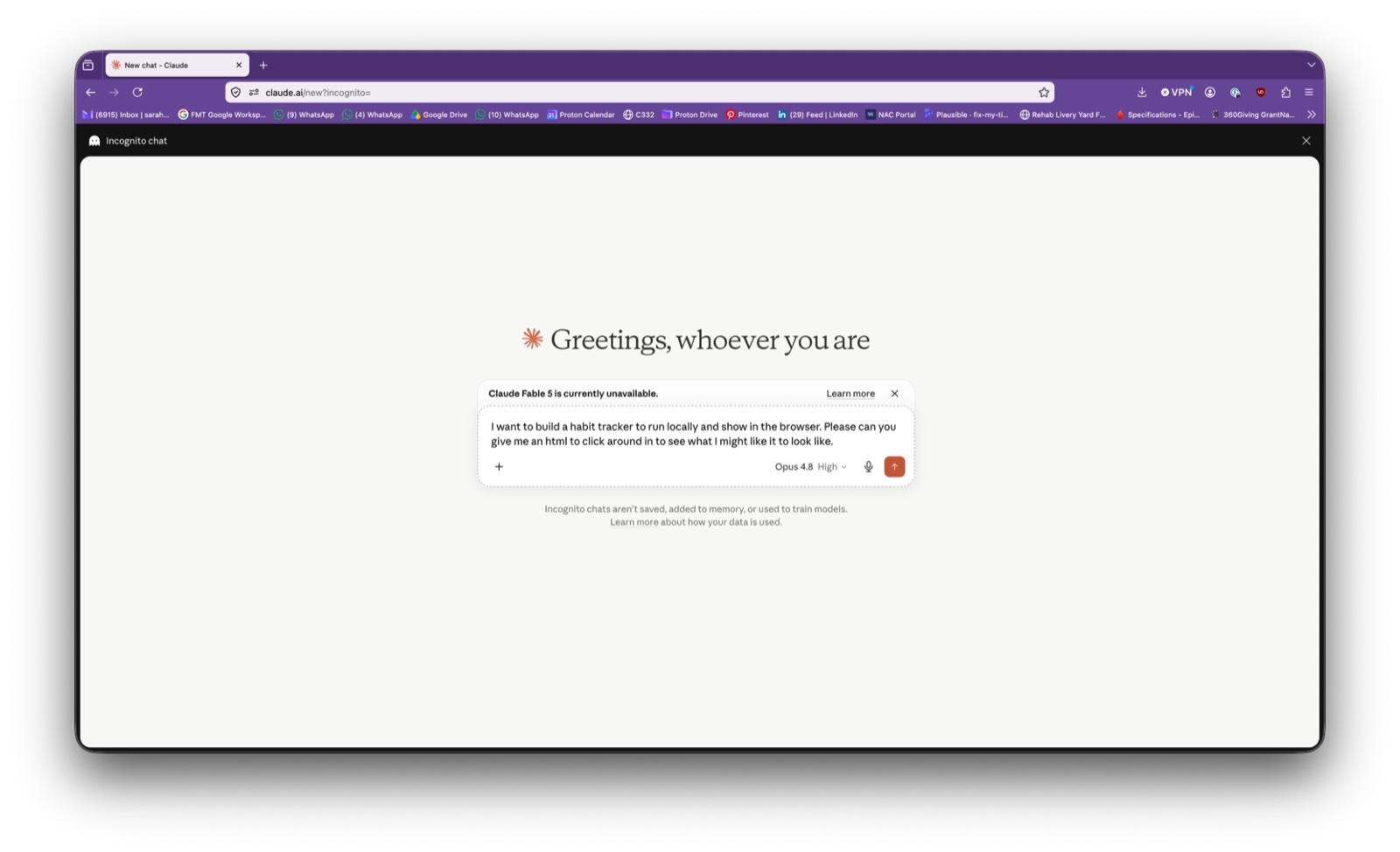
Step two: ask for a habit tracker
Type something like:
I want to build a habit tracker to run locally and show in the browser. Please can you give me an HTML file I can click around in.
I have just used three expressions you might not be sure about: "run locally", "show in the browser", and "HTML". Hold tight, we'll unpack all three.
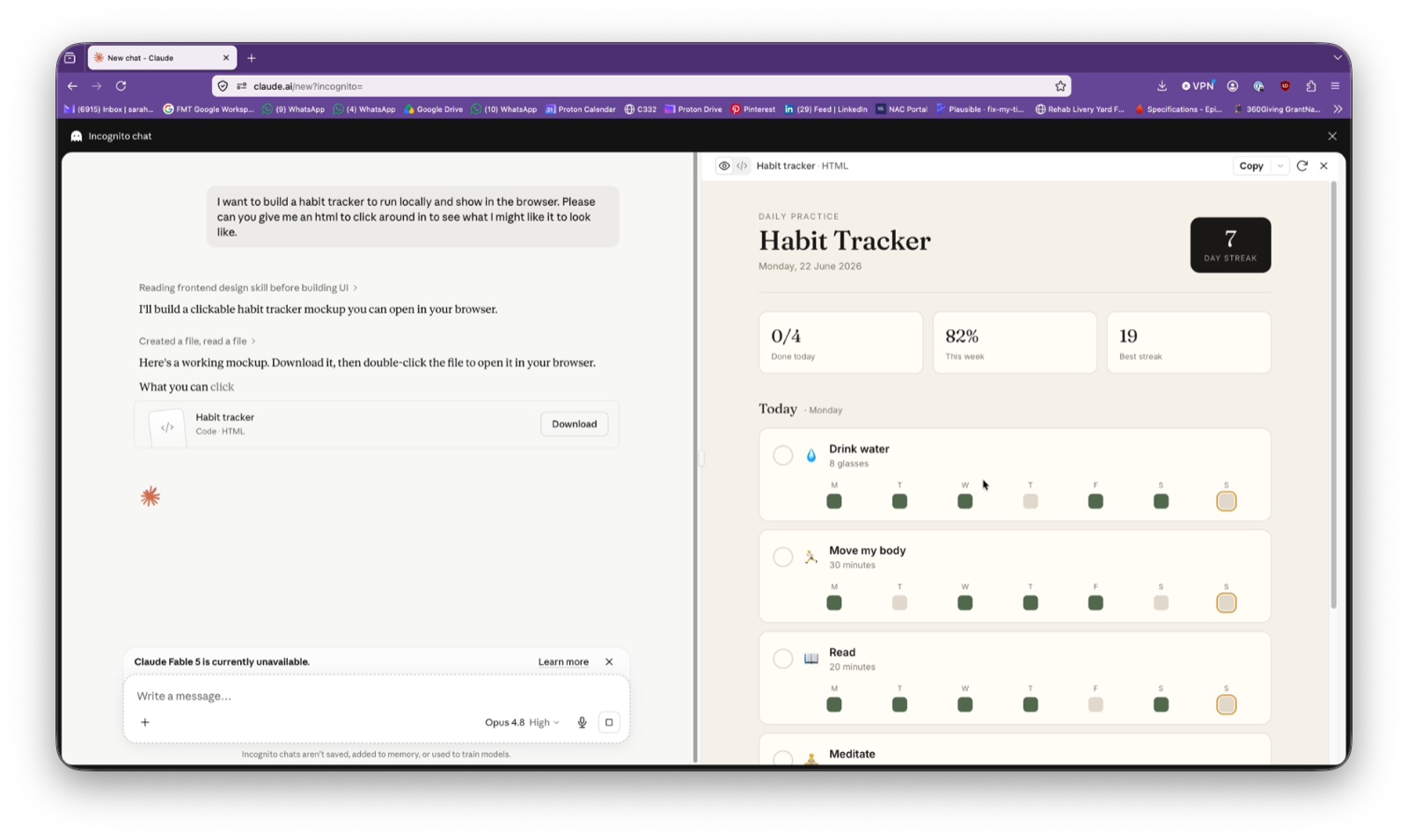
Hit send. The AI thinks for a minute and gives you back a working little thing in its preview pane. Mine has a date at the top, a list of habits, tick boxes for each day, a streak counter. It looks shiny. It looks like software. That is because it IS software. Built in ninety seconds, by typing one sentence.
Step three: get it onto your computer
In Claude (or your AI of choice) there will be a way to download the file the AI just made. In Claude, it's a little download button in the chat. Save the file to your Downloads folder for now.
Open Finder (if you're on a Mac) or File Explorer (on a PC), find the file, and double-click it.
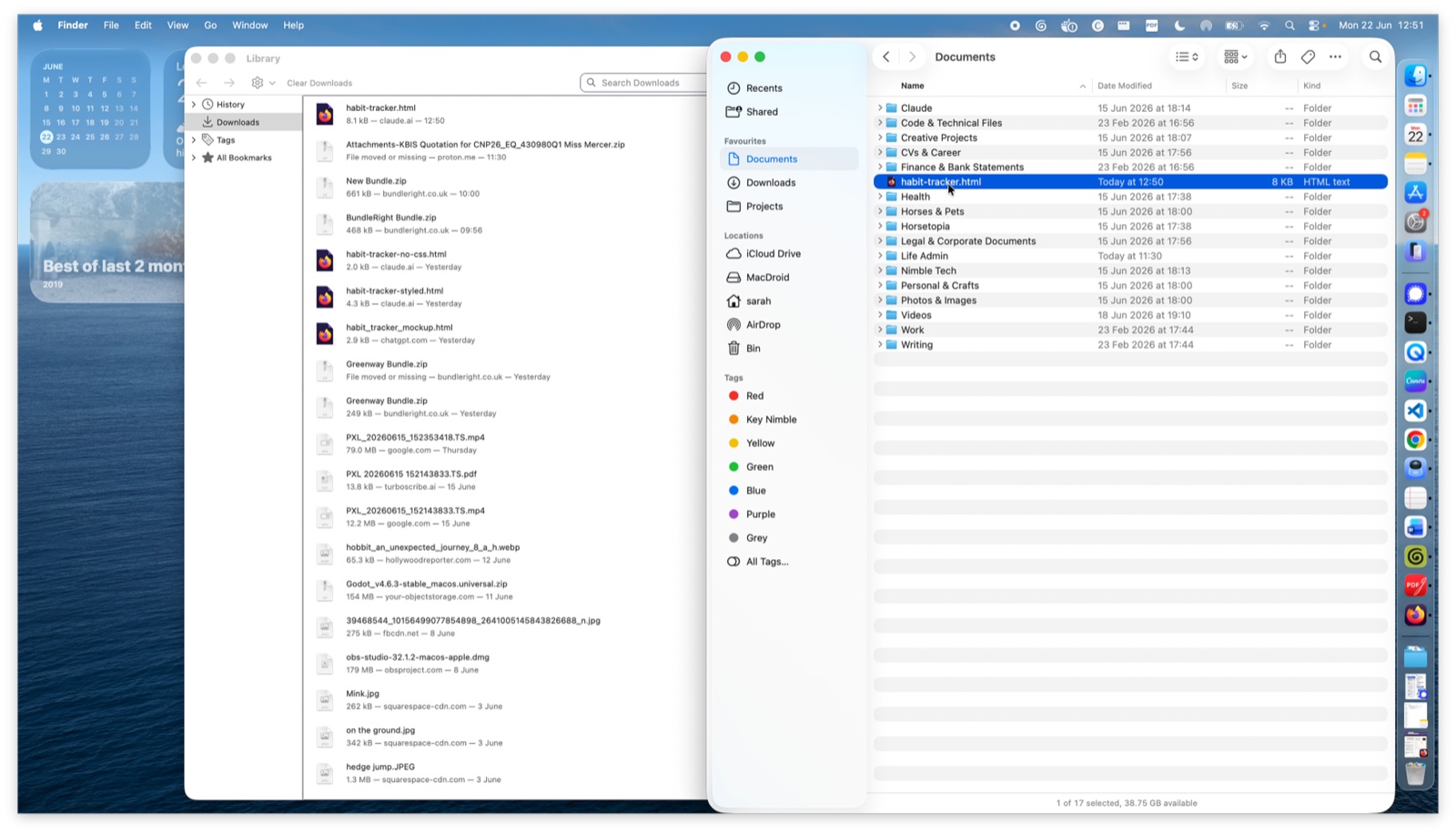
When you double click on it, it will open in whatever tool you use to access the internet (I'm using Firefox). This is your 'browser'. The habit tracker appears, exactly the way it looked in the AI preview.
Now look at the address bar. Where you would normally see something like www.google.com, you'll see something like:
file:///Users/yourname/Downloads/habit-tracker.html
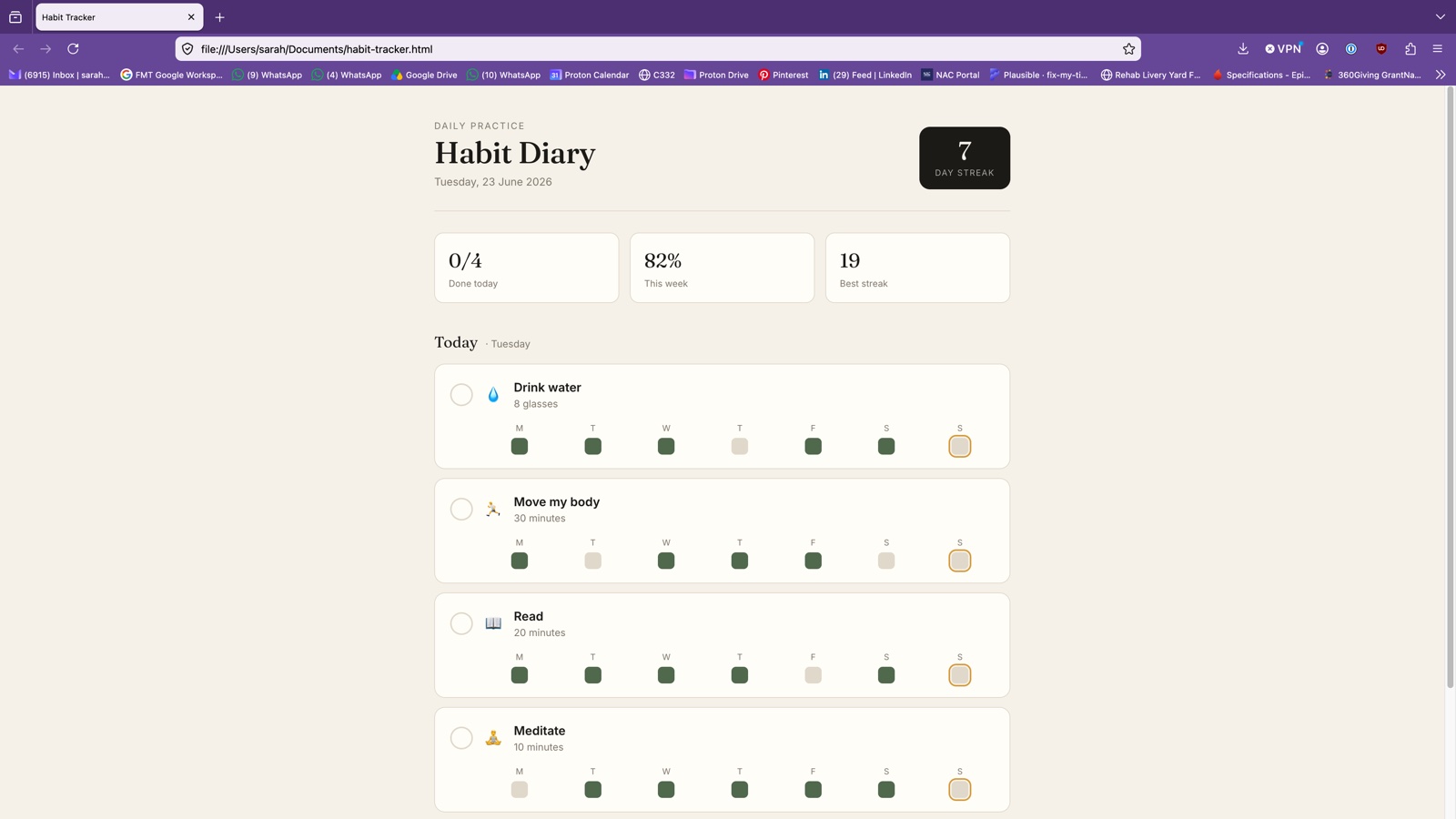
The browser is telling you: "I did not go out onto the internet to find this. I found it on your computer."
That is what run locally means. "Local" just means: on your computer, not on a server somewhere else on the internet. The thing in your address bar isn't a web address, it's a file path. (file:// instead of https://.) The same browser does both jobs. Open a real website, it goes off to the internet. Open a local file, it reads from your hard drive. Same browser, same screen, both perfectly valid.
That on its own was a slightly mind-bending realisation for me the first time. The browser isn't "the internet". It's just a thing that reads HTML files. Sometimes those files happen to live on your computer.
Step four: look at what the file is actually made of
Right. Now the bit where it stops being magic.
Download Visual Studio Code (it's free, from code.visualstudio.com, takes a couple of minutes). Open the same habit tracker file in VS Code instead of the browser (right click on it, and select VS Code).
Your screen suddenly goes all Matrix-y. Black background, coloured text, fonts that say "I am important and technical". You may, like me, feel a sudden urge to wear sunglasses indoors.
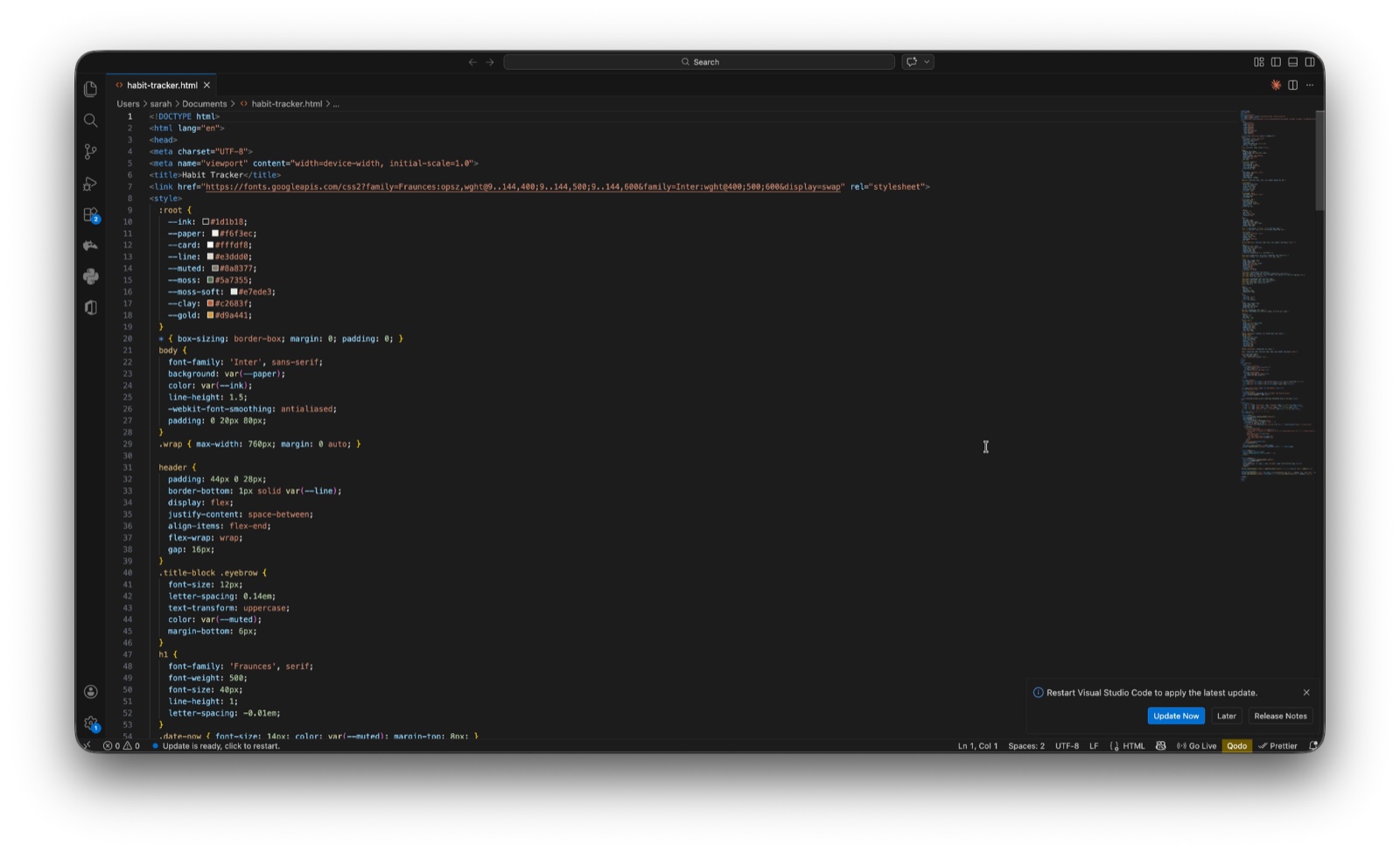
It is the same file you just opened in the browser. Same words, same content. The only difference is how it's being shown to you. The browser was reading it and drawing the pretty version with the boxes and the ticks. VS Code is just showing you what is actually inside.
And what is inside is words. Lots and lots of words. Words inside little pointy brackets, lots of curly brackets, but ultimately just words.
Scroll down until you find a bit that says something like <h1>Habit Tracker</h1>. Change "Habit Tracker" to "Habit Diary". Save the file (Cmd+S on a Mac, Ctrl+S on a PC). Switch back to your browser, hit refresh.
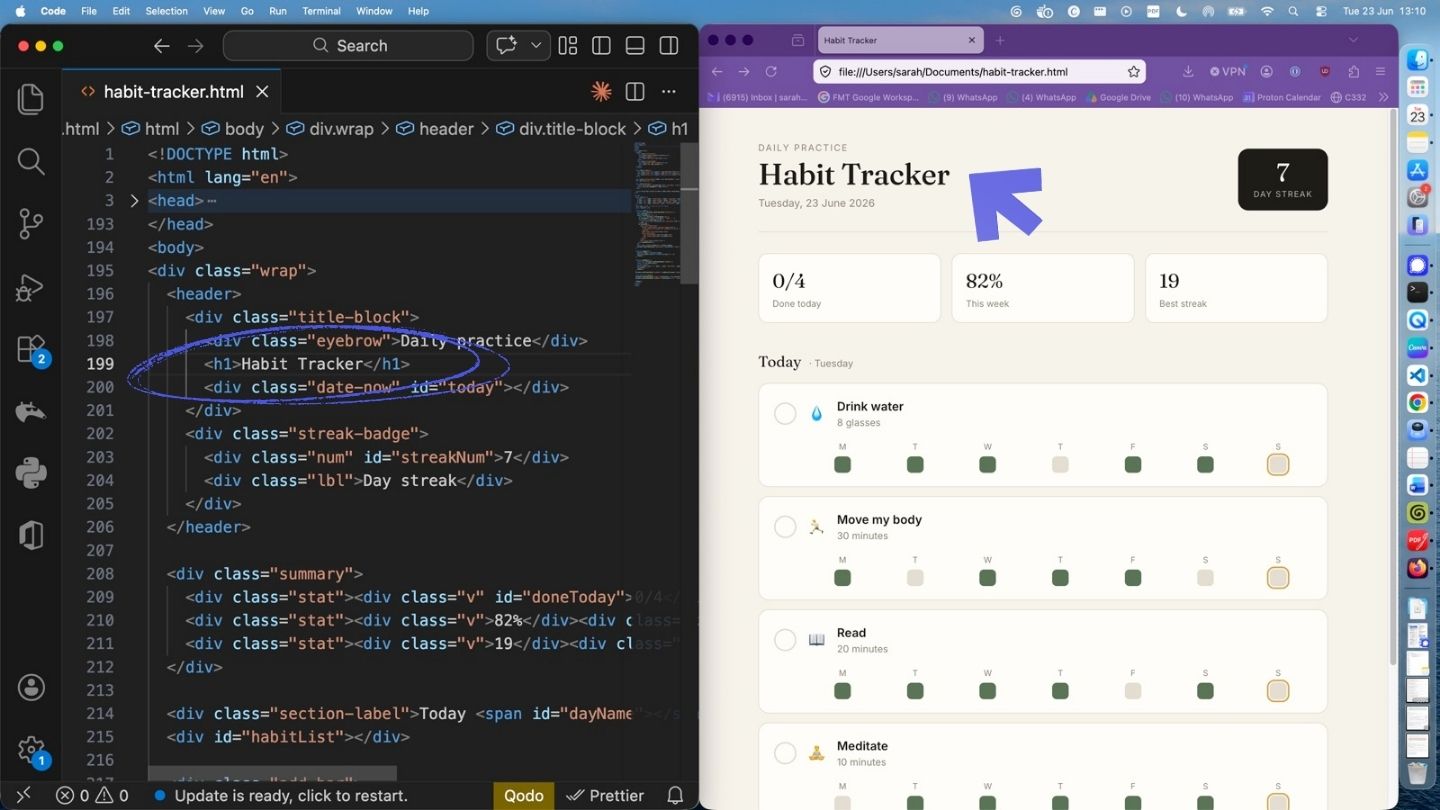
The heading on your habit tracker changes.
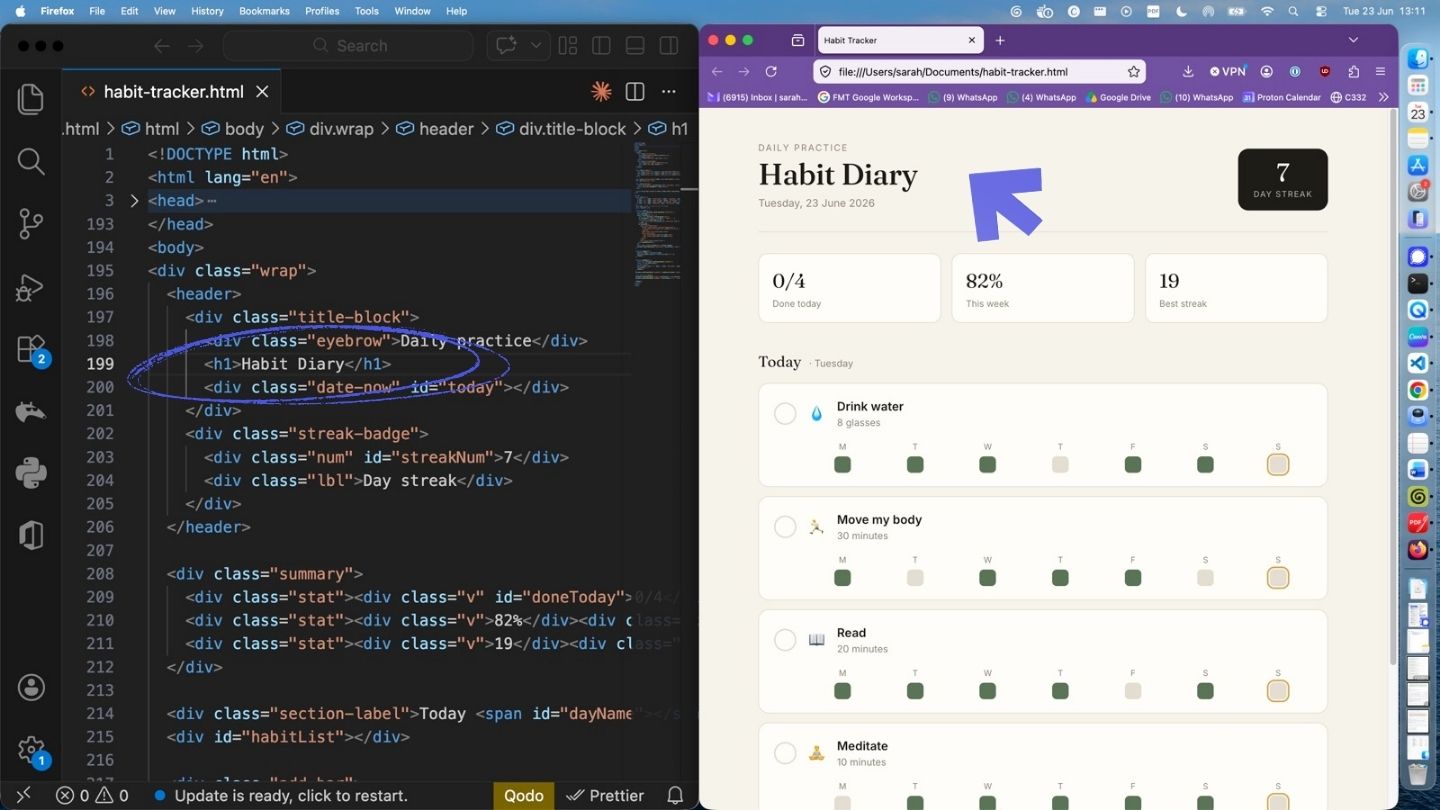
That is the moment. That is the entire trick. The webpage is a file. The file is words. You change the words, save the file, the browser reads the new words, the page changes.
And honestly, that is also what every website you have ever used is doing. Google, the BBC, your bank. Much, much bigger files, on someone else's computer, sent over the internet to your browser. But the same idea, all the way down. Wild, right? Welcome to the new world...
What HTML, CSS and JavaScript actually are
When the browser reads your file, it is actually reading three different sets of instructions, in three different "languages":
- HTML is the content. Headings, paragraphs, lists, buttons, checkboxes. The bones of the page. If you stripped everything else away, HTML on its own would look like a really ugly Word document from 1998. (I'll prove this to you in a second.)
- CSS is the style. Fonts, colours, spacing, the rounded corners, the gentle hover effects. The paint job.
- JavaScript is the behaviour. The bit that makes ticking a box actually mark a habit as done, the bit that updates the streak counter when you do.
You can see all three in the same file when you look in VS Code. The AI tucked the CSS inside a <style> section near the top, and the JavaScript inside a <script> section near the bottom, instead of splitting them into separate files. That's fine, and quite common for a small page like this.
Just to show you how much CSS is doing for you: I deleted the entire <style> section, saved, and reloaded. The page still works perfectly. All the boxes tick. The streak counter updates. It just looks like garbage. Pure unstyled HTML, default font, white background, no spacing. Gross.
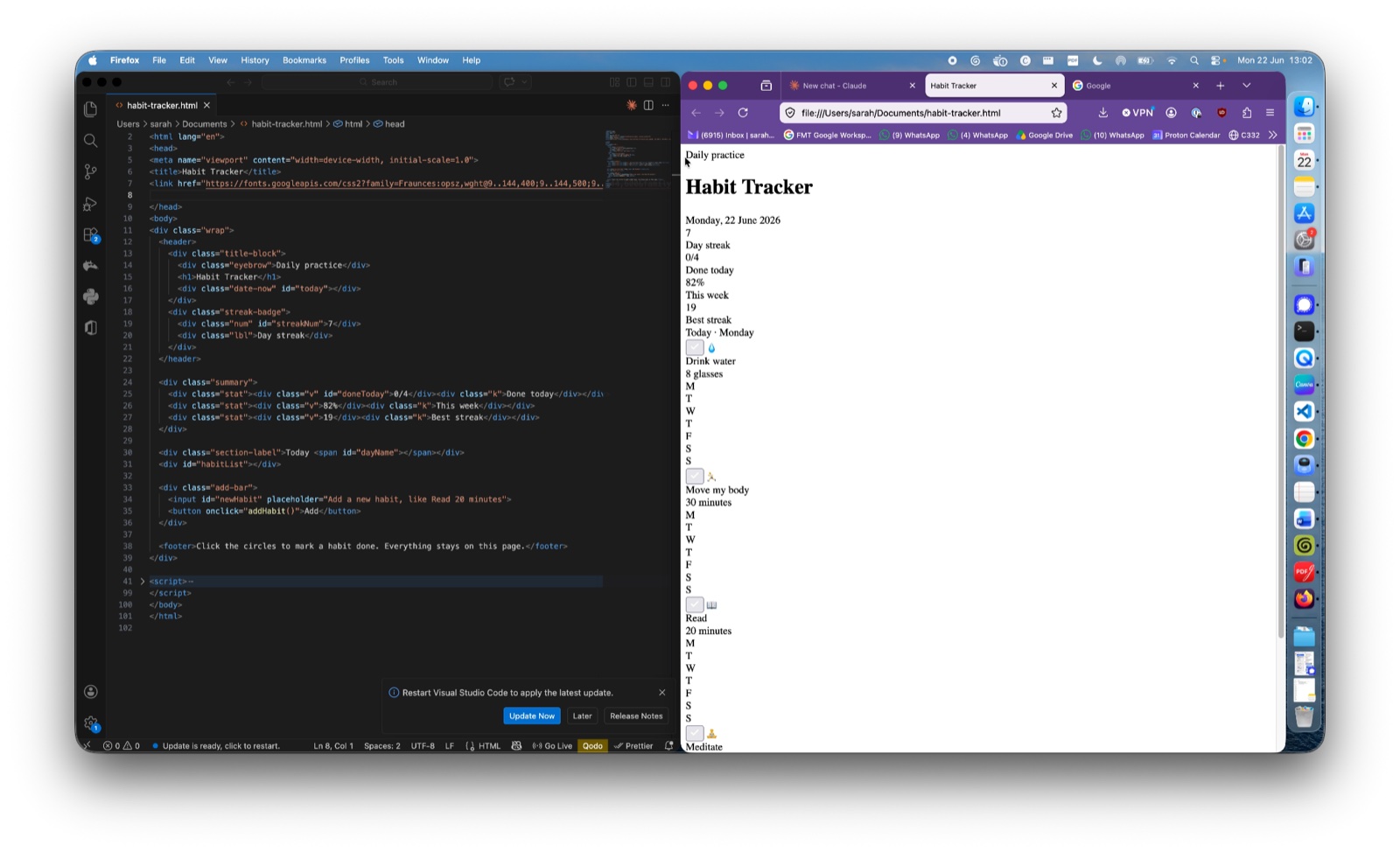
Then I put the CSS back, reloaded, and the polished thing returned. Again, HTML is WHAT is presented to you. CSS is HOW you see it.
One more useful thing: file extensions are just sticky notes
Quick aside, because this tripped me up for years.
Pre my tech era, I thought the .pdf at the end of a PDF was somehow part of the file. Like, the file IS a PDF because of some deep magic involving the file extension. I assumed that if you renamed a PDF to .docx it would magically become a Word file.
It does not.
The bit at the end of a file name (.html, .pdf, .docx) is basically a sticky note your computer reads to decide what program to open the file with. Your operating system sees .html and goes, "right, that's for the browser." Sees .pdf and goes, "right, Adobe (or Preview)." Sees .docx and goes, "right, Word."
That's it. Sticky notes. The file underneath is just the file. Madness.
What you just did
Let's tally up. In about ten minutes, you have:
- Asked an AI to build you 'software'
- Got that software running locally on your own computer
- Opened the underlying file and changed it
- Watched the change appear in your browser
- Picked up roughly what HTML, CSS and JavaScript each do
- Found out what "locally" actually means
- Demystified file extensions for the rest of your life
That's the foundation. Email me to let me know how you got on, or if you got stuck. The passive time recording tool we are heading toward is just more of this, with a few extra ideas layered on. What fun.
Next time: we are going to tidy this up, give it a proper folder of its own (rather than letting it float around in Downloads), and I'll introduce you, gently and painlessly, to something called GitHub, which is basically just an online database where all the different versions of your code files live forever. So if your laptop ever dies, or you ever want the version of your habit tracker that existed last Tuesday, you can find it, and you can share it with someone else with a link.
If you want each lesson to land in your inbox, pop your email in below.